




Student Blog
Classes

Savi’s Electives Experiences ⟩
October 7, 2020, by Savi
Classes
Over the past two semesters, I have had the opportunity to choose between a variety of elective courses to take in order to dive deeper into the subject matter I am interested in and begin my journey from an OT generalist to specialist. As a second year in the Master’s program, students are given the chance to take 12-14 units of elective coursework so that they can begin to focus in an area of interest.
When I began this Master’s program I was extremely interested in taking the OT 561: Occupational Therapy in Acute Care elective, as I have always been interested in pursuing a career in acute care. Unfortunately, this elective was no longer offered this semester as they wanted to keep all students, faculty, and patients healthy and at a safe distance. Although this was sad news for me, this decision also allowed me to explore electives I wouldn’t have otherwise! Now looking back on my decisions and experiences I could not have imagined it any other way! I love all of my electives and have learned such valuable information that will help guide me in whatever practice setting I choose in the future. Here is a glimpse into my electives and why I chose them!
OT 574: Enhancing Motor Control for Occupation
This semester I was fortunate enough to have been randomly selected to take the Motor Control elective at the California Rehabilitation Institute. This course has opened my eyes to so many unique and fun things OTs can do in an inpatient rehabilitation setting. Before beginning this course I knew that I wanted to hopefully work as an OT in an inpatient rehabilitation or acute setting after graduation, but was worried I wouldn’t have experience working with patients in either of these settings. This course provided me with four hours of weekly clinical experience with patients guided by an assigned clinical instructor, as well as lecture material focused on providing tangible methods for remediation of motor control problems following upper motor neuron lesions. In lectures, we spent half the time learning the theories and concepts of motor control and motor learning, and then the other half applying our knowledge and skills in practice. Through this class, I learned how to complete scapular and trunk assessment, facilitation, and mobilization, shoulder subluxation positioning and taping, inhibitory casting, neuromuscular electrical stimulation, edema management, and much more! Check out the pictures at the bottom to see what these look like. I had a lot of fun working with patients and applying my knowledge in real-time with the assistance of experienced OTs.
OT 575: Dysphasia Across the Lifespan
As a food lover myself, I have always listed eating as my #1 favorite occupation. After working in a few pediatric settings and seeing how impactful OTs can be in the feeding process, I wanted to learn more about our impact across the lifespan. This course has provided me with an immense amount of knowledge regarding the various assessment and treatment strategies used for patients and caregivers. I have also gained a greater understanding of the oral, pharyngeal, and esophageal anatomical structures involved in swallowing and how they relate to normal and abnormal swallowing. On the last day of class we all received a large box of delicious snacks to eat and test out. This helped us gauge the sensory qualities, understand the effects chewing has on consistency and texture, and brainstorm fun activities with each snack option to engage our future clients.
OT 566: Healthcare Communication with Spanish-Speaking Clients
¡Hola! Mi nombre es Savi y yo soy su terapeuta ocupacional. I am extremely passionate about developing a comfortable and safe environment for all my clients. During my time completing observation hours in San Diego and fieldwork in Los Angeles, I have noticed that a large quantity of the patients and clients I have worked with are primarily Spanish speaking. Because of the language barrier, I felt as though I am not able to make them feel as comfortable as I could. I, therefore, wanted to take advantage of this opportunity to learn how to communicate in Spanish at an elementary level in a therapeutic context. By doing so I have learned how to say common OT phrases and terms in Spanish, to facilitate better connections and relationships with my future clients. Dr. Delgado has brought in OTs from a variety of settings to help us learn context-specific and cultural terms and phrases. Gracias, Profesor Delgado!
OT 564 Sensory Integration Theory
I decided to take sensory integration (SI) theory because I wanted to get a better understanding of the neuroscience backing and foundation for sensory integration. After completing the pediatrics immersion, I didn’t feel confident about the level of understanding I had regarding SI in comparison to other students I had spoken to in my cohort. This made me extremely nervous since SI is so important and prevalent in OT practice across all settings. I, therefore, wanted to get a better grasp on the neurobehavioral principles of Sensory Integration Theory before entering into my Level II fieldwork and eventually sitting for the NBCOT exam. This class did just that!
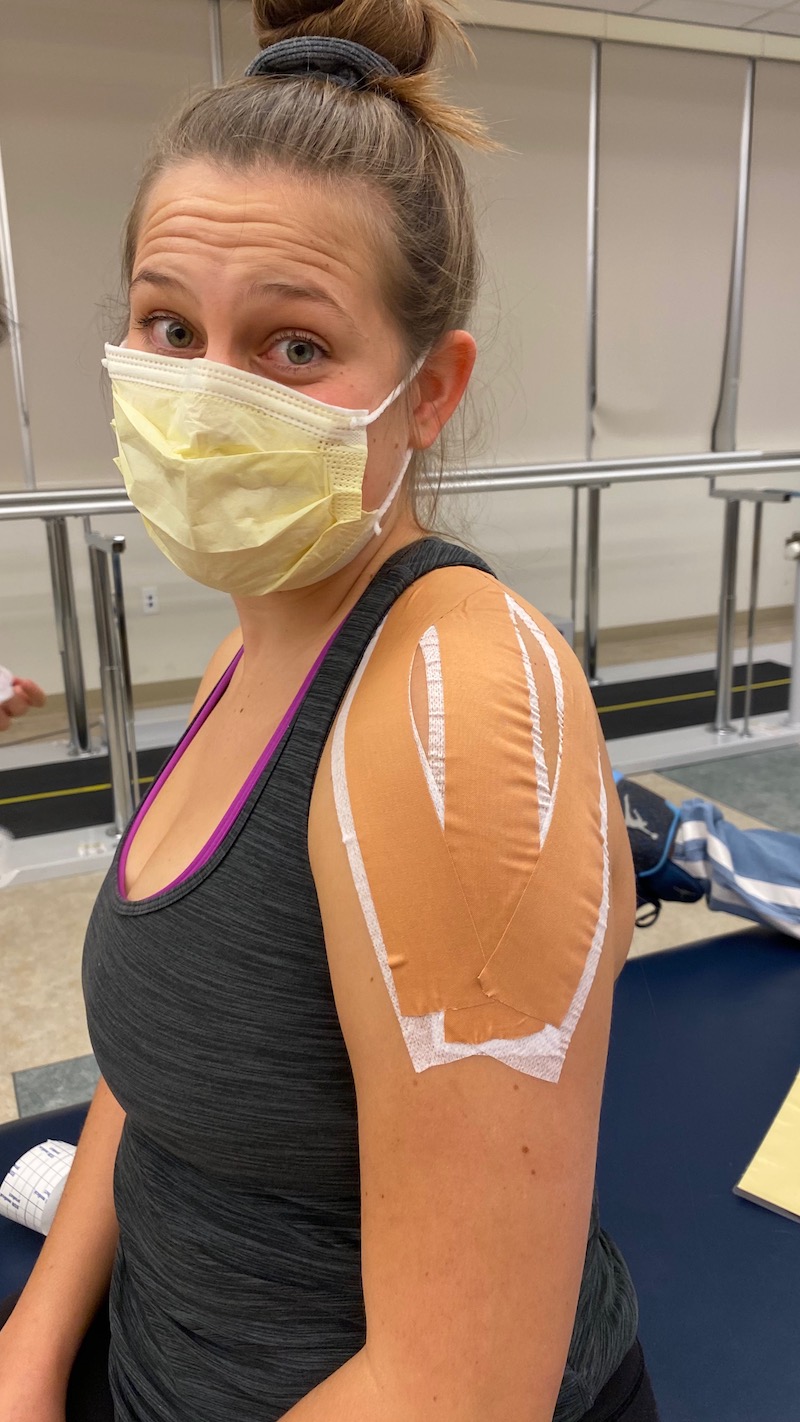
Showing off my shoulder taping, which is used to assist with realigning and supporting a shoulder joint with subluxation.
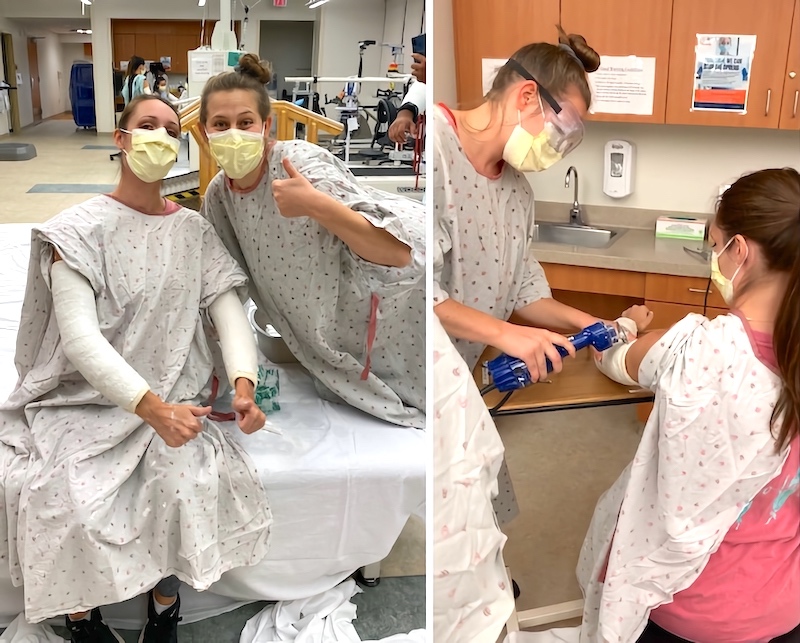
Practicing serial casting on classmate Alana Schoenhals to manage tone. We even got to saw off the cast we made!
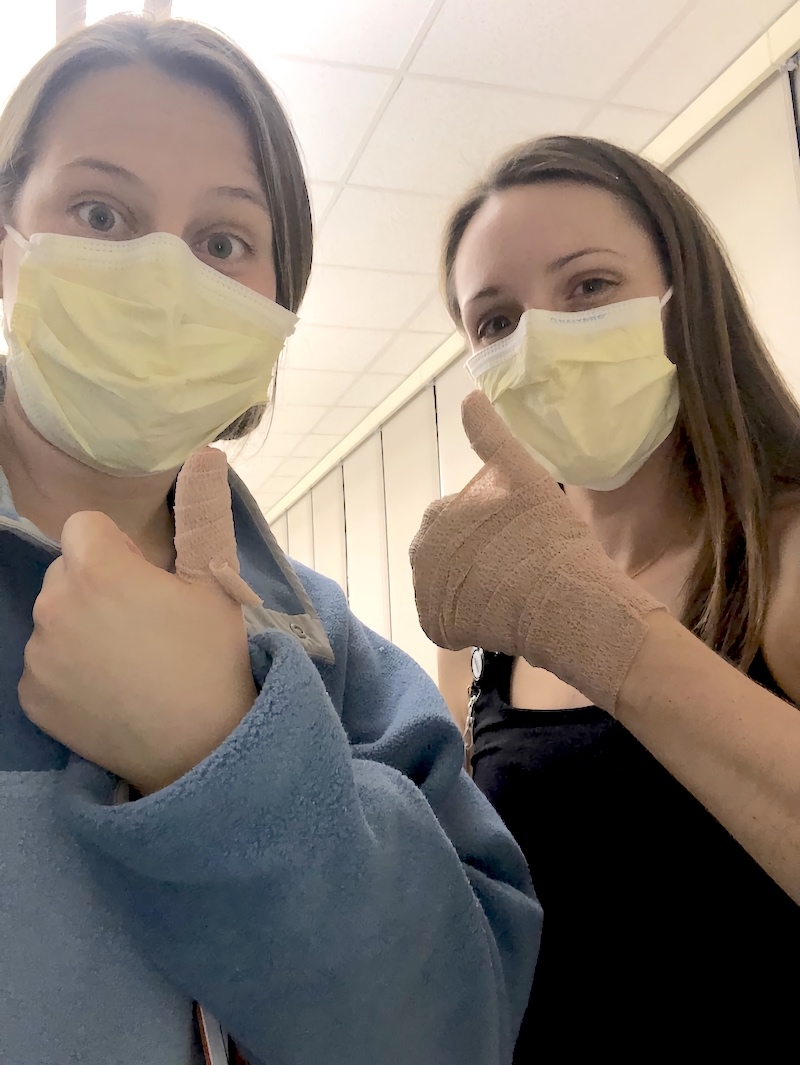
Classmate Alana Schoenhals and I showing off our compression bandage treatment after doing retrograde massage on one another for edema management.
⋯

My first time on campus ⟩
October 2, 2020, by Yna
Classes Videos
From the time I enrolled in my Master’s program at USC, one thing I had really been looking forward to was getting to visit the beautiful campus that I have only been seeing in pictures. Unfortunately, due to the pandemic and in efforts to socially distance, I have not been able to do this since most of our classes had to be held remotely. One of the courses I was enrolled in, however, entailed an on-campus lab class which gave me the opportunity to finally visit the campus for the first time!
If you’d like to see my experiences during my first time on campus and are curious about the safety protocols in place to keep the Trojan community safe and healthy, check out my video below!
[Credits to Elmo Nicolas for some of the video clips]
⋯

Put Tracking Apps to the Test ⟩
September 30, 2020, by Bethany
Classes Life Hacks
In OT 563: Occupational Therapy in Primary Healthcare Environments, Dr. Valasek gave us an assignment. In primary care (and other OT environments), we may assign our clients a log to learn more about their lives and what affects their occupations, so we as students have to complete a log for ourselves. We get to better understand our practice, not just by practicing, but by experiencing what we may ask our clients to do. Dr. V let us know that we had to track for a week, but she was giving us two weeks to complete the assignment, helping us to understand that some weeks are just not good weeks to have to be responsible for tracking. She was also very helpful in permitting a variety of things that we could track (from mood to food) and in suggesting a variety of methods in which to complete this log. Beyond paper tracking methods, there are a surprising number of phone apps to track things and give reminders for goals, too! Daylio can be used for mood and habit tracking. Anxiety Tracker tracks . . . well . . . anxiety, if you hadn’t guessed. Habit Bull keeps you on track for habits. Lose It! can be used to track food and calories. And there are many more! I decided to check out Lose It! Let’s see how this goes . . .
Monday, Day 1
Today was spent familiarizing myself with the app. When you type in a food to Lose It!, there are so many options, it’s overwhelming. At the same time, I’m glad that they give options for things. I feel like I’d be even more stressed if I chose to do my own paper trackers and hand to configure ingredients and calorie count by myself. Or I’d get lazy and go back to fill in previous days’ meals without remembering exactly what I ate. I’m curious to see if I like the apps enough to keep going after this week.
Tuesday, Day 2
I didn’t eat lunch. I felt lazy about wanting to log food, got distracted by a letter my cousin sent me, and just ended up doing other things during my break. It makes me wonder if food logging accurately portrays what I eat in a week, but at the same time, part of logging is to bring the user’s awareness to their own situation and behaviors, so maybe I’m learning that I eat too much . . . hmmm. The funniest part of today was trying to recognize some of the Chinese food names in English. I had fun estimating dinner portion sizes with my mom, guessing if the amount of rice I ate was one cup or two thirds of a cup. My mom is a physician, so it was fun to hear that Lose It! is one of the apps that she recommends to her patients! She gets to learn a little bit more about it this week, too.
Wednesday, Day 3
I found what I like best about Lose It! You can scan barcodes on foods and it automatically inputs the food, the calories, everything! I tried it on my cereal in the morning, and it was almost more tempting to eat things out of the box, instead of homemade meals. Then, that evening, I discovered the recipe option! You can input all of the ingredients in a dish, put how many portions it makes, and it calculates everything for you. You can also save the recipe, so if it is a dish you make often, it is easy to go back and select. I asked my dad what went into his delicious eggplant dish, got an accurate calorie count for my meal and the recipe for a dish I love. I guess it takes longer than I thought to become accustomed to all of the characteristics of an app, and there are more helpful features than I imagined.
Thursday, Day 4
Today was easier. I got more into the habit of logging food right before I ate it. I also realized that previous meals pop up to make selection of eating leftovers easier. I noticed that the app also has water tracking, which I would love to use, but I don’t think I want to pay for the upgrade. The one downside of today is that Lose It! has me on a schedule with a calorie limit, and I really want brick toast. (If you look up “Oh My Pan!” you can find a very good visual example of my food craving for the day.)
Friday, Day 5
This was the first day I went over my calorie limit. Wow. That little red mark telling me I did something wrong was quite disheartening. I needed a reminder from someone close to me that food tracking is not always perfectly accurate, and that it is okay to have a cheat day. You have to take in the weekly budget numbers, too, and there is a lot more to account for in life that affects what you eat. In the end, I decided to let the app help me be aware of what I was eating, but not kill the vibe. And what can I say: The In-n-Out was worth it.
Saturday, Day 6
Tracking three meals a day has almost become habit. I also liked that I can input the exercise I completed for the day, and it goes into the net calorie count. It’s difficult to estimate calories burned from exercise, but it’s kind of nice to know that you can input that information. No crazy new discoveries on the app today. I’m looking forward to seeing how the week fills out.
Sunday, Day 7
Today my mom asked me, “Are you done tracking yet?” She wanted me to eat cookies with her for dessert. I can definitely see how this may be a downside to using a tracking app. It can affect even social aspects of life! But in the end, I think it’s kind of fun to be able to have more of an awareness of what I’m taking in. And I think I’ll continue to use the app, even if I track less regularly or even if I’m a little inaccurate, the most important thing is that it helps me become more aware of my own health.
I truly enjoy learning about the need for and the implementation of occupational therapy in primary care, and this class has definitely brought some unique learning experiences. I’m excited to keep learning about this area of OT and to keep building skills that I can use in the future.
⋯

Humans of USC Chan Volume 1 ⟩
September 21, 2020, by Calvin
Classes Diversity Videos What are OS/OT?
When I was applying to OT school, I remember that I really wanted to get different student perspectives on what programs were like and how they navigated graduate school. As a student ambassador, I feel so lucky to have the opportunity to share my experiences with all of you, but I know that there are so many other extraordinary voices in the division too!
So, I gathered some second-year Entry-Level Master’s students to come and talk about what their OT school experiences have been like so far! We went over topics related to what kind of OT they’re interested in, what their favorite classes and memories are, and what challenges they’ve faced. They even shared some advice for all of you thinking about applying to the program! If you watch it through YouTube, the video is time-stamped with each topic in case you ever want to go back to a specific conversation.
I hope you find this video helpful and that these diverse perspectives give you more insight into what student life is like in the Master’s program! Welcome to the Humans of USC Chan!
⋯
Tips to Stay Organized ⟩
September 10, 2020, by Savi
Classes Life Hacks
During my time in graduate school, I found that success is closely tied to organizational skills. Towards the beginning of each semester, I typically become overwhelmed by my new schedule and all of the combined assignments. I, therefore, have discovered a few simple ways to help ease my concern and make it ALL seem a little more manageable. Here is a list of a few tips you may find helpful to assist you with staying organized throughout the semester.
1. Weekly Schedule
Develop a weekly schedule PDF, Excel, or Word document that you can always refer to when you need to schedule a meeting, a study session with friends, a doctor’s appointment, or time to engage in a meaningful and rejuvenating occupation such as exercising. This weekly schedule can be color-coded and can include everything that you have committed your time to on a continuous weekly basis. This will allow you to view your weekly class, volunteer, fieldwork, and work schedule in one location, making it easy to see what time you have available in order to schedule events or utilize and assign your free time to activities and assignments. I also add in blocks for driving and eating to better understand what time I have completely free and what time I am filling with other necessary occupations. Here is my weekly calendar example:
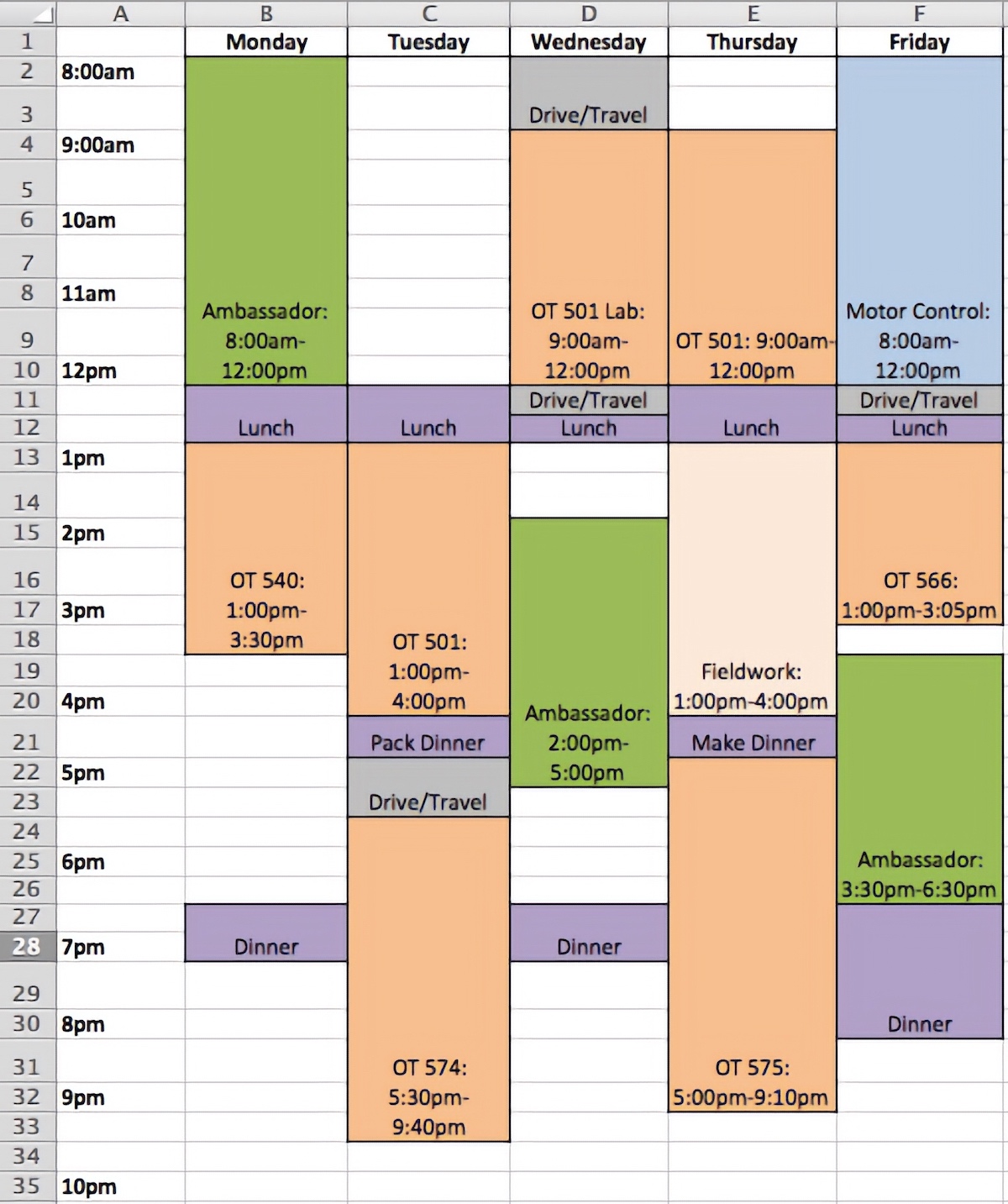
Savi’s Weekly Class and Work Schedule on Excel
2. Excel Assignment List
At the start of each semester I go through every single syllabus and note the assignment with the due date on an excel document. I color-code each class and then use the sort tool to organize the assignments by the due date. This way I can scroll through at the end of each week to see what I need to do over the weekend, plan what I can complete during my free time allotted in my weekly schedule, and check to make sure I have completed the all of the assignments before I go to bed each night. This is a quick and easy way to have all the assignments and exam due dates listed in one location! You can also delete the row or change the color of the assignment once it is completed to feel a sense of relief and instant satisfaction. Here is how I created mine:
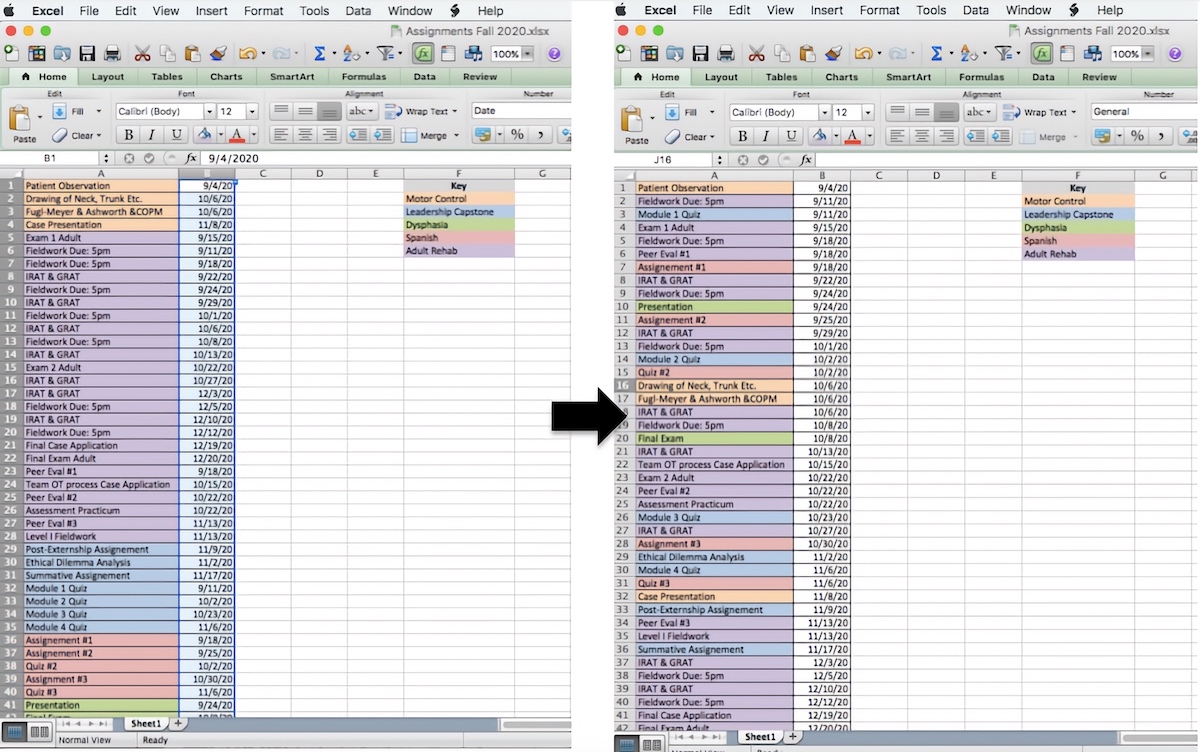
Savi’s Assignments in an Excel List. To get from the first color-coded list to the second list organized by date due follow these instructions: 1. Highlight the “B” column as demonstrated in the picture on the left. 2. Select “Data” from the drop-down menu at the top of the screen. 3. Select “Sort” and choose the “expand the selection option”. 4. Select “Column B” option from the column drop-down and select the “January, February, March, April . . . December” option from the order dropdown. This option may be listed under “custom list” if you haven’t recently selected it. 5. Select the “ok” button at the bottom of the pop-up box and the excel sheet will sort your data!
3. Digital USC Folder
I created a folder for all things USC on my desktop. Inside this folder, I have created subfolders to save and organize my documents into. For example, I have folders for each semester. Once you open my semester folder you will find a folder listed for each class I am taking. This makes it extremely easy to find my notes, study guides, online textbooks, or anything else I need for each particular class.
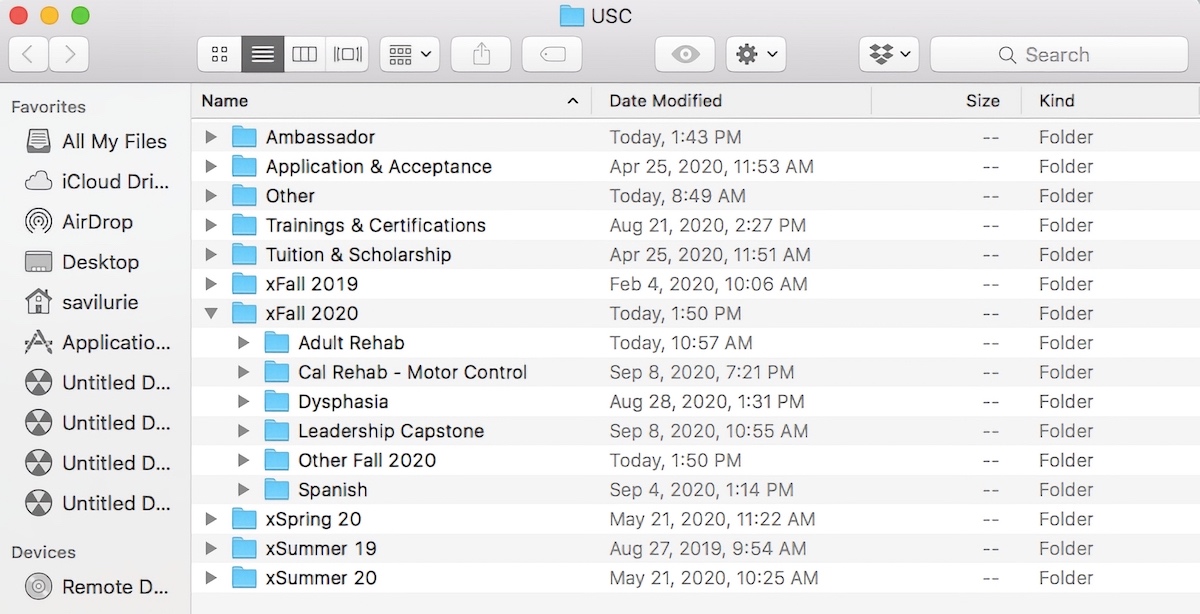
Savi’s USC Folder Organization System
4. Sticky Notes
I utilize the sticky note tool on my desktop to write down small to-do lists each day, reminders, and zoom links for class that aren’t linked through blackboard to make them easily accessible. If you do not have the sticky note tool on your desktop you can do this by hand in a planner, on your phone in a notes section, or in a word document that you can continuously update.
5. Shared Calendar
I have developed a monthly calendar that is linked to my computer and to my phone. That way if I add anything on one device it will automatically link to the other. This is helpful if I am out of the house and have to organize a meeting, event, or group project. You can do this on Outlook, Google Calendar, iCal, etc. I add my classes, any breaks or holidays to that calendar, and any appointments or future reminders in this calendar.
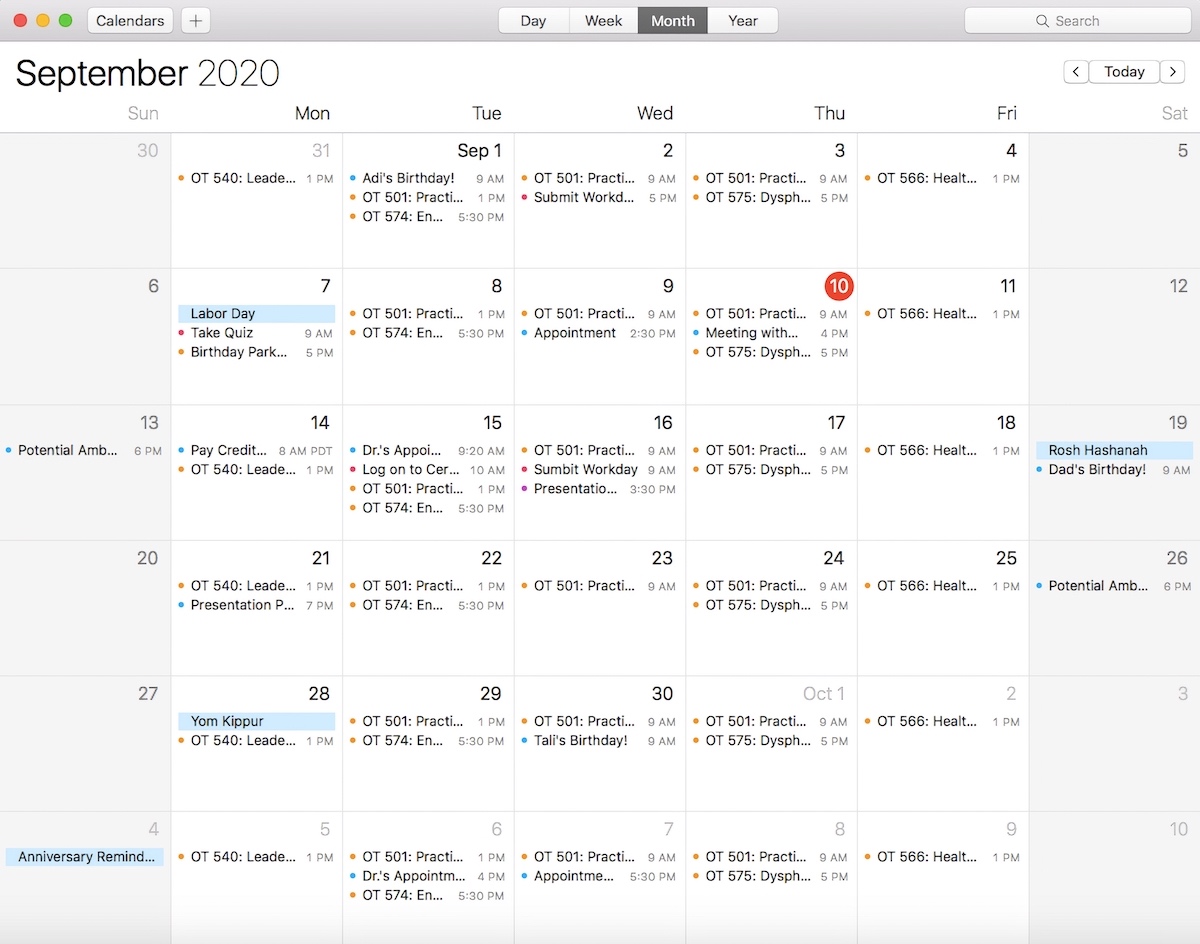
Savi’s Monthly iCalendar
I hope this list has provided you with at least one technique that can help you stay organized this semester. Be sure to tailor these items to fit your particular needs!
⋯
Social
Facebook Instagram LinkedIn TikTok YouTube